
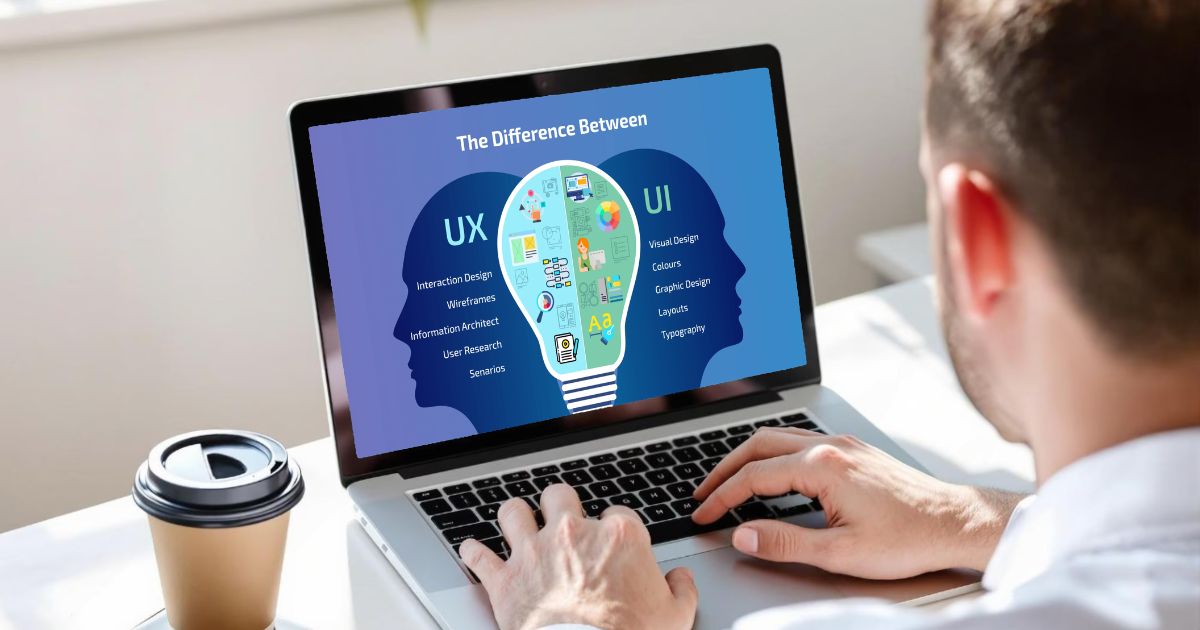
UI vs UX: What is the Difference Between UI and UX Design
 Published:
April 28th, 2026
Published:
April 28th, 2026

UI and UX are two design terms that are used interchangeably but are different aspects of digital design. Understanding UI vs UX key differences is vital to improving your website’s overall visibility.

Sahil Bansal
Founder & CEO
13 min read
Last Updated: 27 July, 2026
User Interface [UI] and User Experience [UX] are two common terms that are used interchangeably.
Most people use these terms together. However, both are separate parts of creating websites and products. They are distinct aspects of digital design.
UI refers to the interactivity and feel of a product. On the other hand, UX refers to the interaction that the user has with a product.
Despite so many overlaps, UX/UI design have their own distinct and unique areas of expertise.
In this blog post, we will study the definitions of UX and UI design, what these elements typically entail, and what is the difference between UI and UX design.
Key Takeaways:

Who This Guide Is For: Designers, developers, product managers, business owners, and anyone looking to understand how UI and UX work together to build successful digital products.
What You’ll Learn: The core differences between UI and UX, how each contributes to user satisfaction, and why both are essential for creating intuitive, high-performing websites and applications.
Key Insight: Great digital experiences are never driven by visuals alone. A successful product combines a seamless user experience with an intuitive, visually engaging interface.
Why It Matters: Understanding the distinction between UI and UX helps businesses make smarter design decisions, improve user engagement, reduce friction, and increase conversions.
Best Fit For: Organizations redesigning their websites, launching new digital products, or improving existing user experiences to increase customer satisfaction and business growth.
Keep in Mind: UI and UX are complementary disciplines rather than competing ones. Strong UX provides the structure, while effective UI enhances usability through thoughtful visual design.
Defining UI vs. UX design
UI/UX design is the process of creating digital products that are both visually appealing and easy to use. Both combine User Interface (UI) and User Experience (UX) to build effective digital experiences. Both work on the principle of improving website design and are an essential part of website promotion.
What is User Experience [UX] Design?
User Experience (UX) design is the process of creating websites, apps, and digital products that are easy to use, efficient, and enjoyable. It focuses on understanding user needs and designing seamless experiences that help users achieve their goals with minimal effort.
- User-Centered Approach: UX design begins with understanding user behavior, expectations, and pain points to create solutions that meet their needs.
- Seamless Navigation: It structures content logically, simplifies navigation, and removes unnecessary steps to make every interaction smooth and intuitive.
- Core Design Elements: UX combines usability, accessibility, functionality, and performance to deliver a meaningful and friction-free experience.
- Problem-Solving Focus: Instead of concentrating on visual appearance, UX aims to solve user challenges and improve how a product works.
- Business Benefits: A well-designed user experience improves customer satisfaction, builds trust, encourages repeat visits, and increases conversion rates.
- Ultimate Goal: The objective of UX design is to create a seamless journey where users can complete their tasks quickly, confidently, and without frustration.
What is User Interface [UI] Design?
User Interface (UI) design is the process of designing the visual and interactive elements of a website, app, or digital product. It focuses on creating interfaces that are attractive, easy to navigate, and simple for users to interact with.
- Visual Design: UI includes elements such as buttons, icons, colors, typography, images, spacing, and layouts that define the product’s appearance.
- Interactive Experience: It ensures that menus, forms, navigation, and other interactive components respond smoothly and make user interactions effortless.
- Consistency Across Screens: UI design maintains a consistent look and feel throughout the product, helping users navigate with confidence and strengthening brand identity.
- Clear Communication: Well-designed interfaces make actions, buttons, and navigation easy to identify, reducing confusion and improving usability.
- Engaging User Experience: An attractive and intuitive interface captures users’ attention, encourages interaction, and makes the product more enjoyable to use.
- Works Alongside UX: While UX focuses on how a product functions and solves user problems, UI enhances that experience by making it visually appealing, intuitive, and engaging.
How do UX Designer and UI Designer Work Together?
UX and UI designers work closely throughout the product development process to create digital experiences that are both functional and visually engaging. While UX focuses on how the product works, UI ensures it looks appealing and is easy to interact with. Together, they create products that are intuitive, user-friendly, and aligned with user expectations.
UX Lays the Foundation: UX designers begin by researching user needs, identifying pain points, and planning how the product should function. They create user journeys, wireframes, and information architecture to build a clear and logical structure.
UI Brings the Design to Life: Once the UX framework is ready, UI designers transform wireframes into polished interfaces by adding colors, typography, icons, buttons, layouts, and other visual elements.
Continuous Collaboration: UX and UI designers work together throughout the design process, sharing feedback and refining the product to improve both usability and visual consistency.
Shared Goal: UX ensures users can complete tasks easily, while UI makes those interactions intuitive, engaging, and visually appealing. Together, they deliver a seamless user experience.
Balanced User Experience: A successful digital product combines UX’s problem-solving approach with UI’s visual design expertise, ensuring it is both easy to use and enjoyable to interact with.
UX vs UI at a Glance
- UX defines the experience: It focuses on the product’s structure, functionality, and user journey.
- UI delivers the experience visually: It enhances the product through thoughtful design, interactive elements, and consistent branding.
- Together they create better products: Combining strong UX and UI results in digital experiences that improve usability, engagement, customer satisfaction, and business outcomes.
Key Areas
| Factor | User Experience (UX) | User Interface (UI) |
|---|---|---|
| Focus Area | Complete user journey | Interactive part of the journey |
| Purpose | Smooth workflow for a functional website | To make the product visually appealing |
| Process | Research and planning | Visual execution |
| Outcome | To make navigation easy | To make the product visually appealing |
| Tools to be Used | Research surveys, wireframing tools, heatmaps, and usability testing platforms | Figma, Adobe XD |
| User Interaction | Transforming the overall user experience for a website | Considering the direct interaction point |
UI vs UX – Key Differences to Consider
When it comes to building a successful app or website or app, two terms often come up together: UI and UX. While they work hand in hand, they are not the same. Understanding the difference between UI and UX is essential for creating products that not only look good but also perform seamlessly.
Focus Area
UX focuses on the complete user journey. It studies how users move through a website or app, what problems they face, and how easily they can complete their goals. It is concerned with structure, flow, and usability.
On the other hand, UI focuses on the visual and interactive parts of that journey. It deals with what users see on the screen, such as buttons, colors, typography, spacing, and layout. It ensures that every visual element is clear, attractive, and consistent.
Purpose
The purpose of UX is to make the product easy, useful, and efficient. It aims to remove friction and ensure users can complete tasks without confusion or frustration. UX solves problems from a functional and behavioral perspective.
The agenda of UI is to make the product visually appealing and interactive. It enhances engagement by presenting content in an attractive, readable, and aligned way to match it with the brand identity.
Process
UX involves research and planning. It includes understanding user needs, creating user personas, mapping user journeys, designing wireframes, and testing usability. It is more analytical and strategy-driven.
UI involves visual execution. It involves selecting color schemes, designing layouts, creating buttons and icons, choosing typography, and ensuring visual consistency across all screens. UI is more design and detail-oriented.
Outcome
A strong UX results in a product that feels smooth, logical, and easy to use. Users can navigate without effort, find what they need quickly, and complete actions efficiently.
A strong UI results in a product that looks modern, clean, and visually engaging. It creates a strong first impression and keeps users interested in interacting with the interface.
Tools and Methods
UX designers use tools like user research surveys, wireframing tools, heatmaps, and usability testing platforms to understand behavior and improve structure.
UI designers make use of design tools like Figma, Adobe XD, and Sketch to create high-fidelity visuals, design systems, and interactive components.
User Interaction vs User Experience
UX analyzes the overall feeling a user gets when using a product. It aims at answering: Was the experience smooth, helpful, and efficient?
UI elements consider direct interaction points. It answers: Was the interface easy to understand and visually clear while interacting?
UX/UI – Which One to Choose?
Choosing between UX (User Experience) and UI (User Interface) depends on your interests, strengths, and career goals. While both play a vital role in creating successful digital products, they focus on different aspects of the design process.
- Choose UX If You Enjoy Problem-Solving: UX is ideal for those who like researching user behavior, identifying pain points, and improving how a website or app functions. It involves user research, wireframing, prototyping, and usability testing.
- Choose UI If You’re Passionate About Visual Design: UI is a great fit if you enjoy creating attractive interfaces using colors, typography, layouts, icons, and interactive elements. It focuses on making digital products visually engaging and easy to navigate.
- Consider Your Strengths: If you’re analytical and enjoy strategy, UX may be the better choice. If you’re creative, detail-oriented, and have a strong eye for design, UI could be a more suitable career path.
- Remember They Work Together: UX and UI are closely connected. UX creates the structure and user journey, while UI enhances it with intuitive and visually appealing design. Together, they deliver a complete user experience.
- Many Professionals Use Both: Website designers, SEO professionals, and digital product teams often combine UX and UI principles to create websites that are both functional and visually compelling.
- There Is No “Better” Option: The right choice depends on your personal interests and career aspirations. Both UX and UI are in high demand and offer rewarding opportunities in the digital design industry.
Partner with Webcazador for High-Performing UI & UX Design
Understand what is the difference between UI and UX design, and choose the element that best fits your website’s needs. UX focuses on how your website works in terms of its structure, flow, and usability. However, UI focuses on how it looks and feels, including design, colors, and interactive elements.
At Webcazador, our website design services help analyze your website’s needs and choose the right balance of UI and UX to improve website engagement, enhance usability, and create a seamless digital experience that delivers real results.
Frequently Asked Questions
Related Posts
Wix vs Shopify vs Squarespace vs WordPress: Which Platform to Choose
Choosing the right website building platform depends on your website goals. Wix is best for beginners, Shopify is ideal for e-commerce growth, Squarespace focuses on premium design, and WordPress offers maximum flexibility.
By Sahil Bansal
Custom Website Design vs Template: Which One to Choose for Your Business in 2026?
Custom website design and template websites offer distinct benefits depending on business needs, budget, and scalability goals. While custom designs provide flexibility, template websites offer affordability and faster setup.
By Sahil Bansal
Top Web Design Trends Shaping Digital Experiences in 2026
Top web design trends in 2026 include custom illustrations, full-page headers, parallax scrolling, neumorphism, 3D colors, white space, chatbots, video elements, grid layouts, and a strong focus on UX/UI.
By Sahil Bansal